Tutorial 5 - Using polymorphism
In Tutorial 4, we made a Pendulum move under a Slider. What if that pendulum moved under the Particle we made in Tutorial 3 instead? Let’s find out, to demonstrate how npsolve makes it easy to do so.
We’ll start by importing what we need:
import npsolve
import numpy as np
import matplotlib.pyplot as plt
from tutorial_3 import Particle, POS
from tutorial_4 import Pendulum, Tether, Assembly, PPOS, PVEL, G
The modified Particle class
We need to add a a few extra methods to the Particle to make it compatible with our pendulum model. So, we’ll subclass it like this.
class Particle2(Particle):
    def set_F_tether(self, F_tether):
        pass

    def pos(self, state, t):
        """The location of the tether connection."""
        return state[POS]

    def vel(self, state, t):
        """The velocity of the tether connection."""
        velocity = np.array([self._xts(t, nu=1), self._yts(t, nu=1)])
        return velocity
That’s it - now this class will substitute for the old Slider class! We’re returning the position and velocity in the same format that was expected from the Slider, and we’ve also added a set_F_tether method (even though it has no effect here other than preventing an exception).
The system
Now, we’ll create the system with the Pendulum2 class, like this:
def get_system(k=1e7, c=1e4):
    np.random.seed(0)
    time_points = np.linspace(0, 1, 51)
    positions = np.random.rand(51, 2) * 10
    particle = Particle2(time_points, positions)
    pendulum = Pendulum()
    tether = Tether(k=k, c=c)
    assembly = Assembly(particle, pendulum, tether)
    system = npsolve.System()
    system.add_component(particle, "particle", "step")
    system.add_component(pendulum, "pendulum", "get_derivs")
    system.add_component(tether, "tether", None)
    system.add_component(assembly, "assembly", None)
    system.add_stage_call("assembly", "set_tether_forces")
    return system
Initial conditions
We’ll set up initial conditions in a similar way to before, but this time, we’ll use the get_init_pos` method of the slider. If the original Slider class had provided this method, we could simply keep using the old get_inits code!
def get_inits(system):
    slider_pos = system["particle"].get_init_pos()
    pend_mass = system["pendulum"].mass
    inits = {
        POS: slider_pos,
        PPOS: system["tether"].get_pendulum_init(slider_pos, pend_mass),
        PVEL: np.zeros(2),
    }
    return inits
Running and plotting
We’ll set up some functions for running and plotting results.
def run(system=None, t_end=1.0, n=100001):
    system = get_system() if system is None else system
    inits = get_inits(system)
    system.setup(inits)
    dct = npsolve.integrate(system, t_end=t_end, framerate=(n - 1) / t_end)
    return dct


def plot_trajectories(dct):
    plt.figure()
    plt.plot(dct[POS][:, 0], dct[POS][:, 1], linewidth=1.0, label="particle")
    plt.plot(dct[PPOS][:, 0], dct[PPOS][:, 1], linewidth=1.0, label="pendulum")
    plt.xlabel("x")
    plt.ylabel("y")
    plt.xlim(-2.5, 12.5)
    plt.ylim(-2.5, 12.5)
    plt.gca().set_aspect("equal")
    plt.legend(loc=2)
    plt.show()


def plot_distance_check(dct):
    plt.figure()
    diff = dct[PPOS] - dct[POS]
    dist = np.linalg.norm(diff, axis=1)
    plt.plot(dct["time"], dist)
    plt.xlabel("time")
    plt.ylabel("length")
    plt.show()
Finally, some functions to execute the script with the default system…
def execute():
    dct = run()
    plot_trajectories(dct)
    plot_distance_check(dct)


if __name__ == "__main__":
    execute()
Results
Now, we have a pendulum attached to particle moving rapidly in 2d!

Our pendulum is now hurtling around with a particle!
Let’s check the pendulum length again to ensure it’s behaving as expected.
plot_distance_check(dct)

Here, our stiff spring and firm damping aren’t quite enough to handle the fast accelerations due to the particle motion. So, we’ll make a a system with different parameters and pass that to the run method.
def execute():
    system = get_system(k=1e9, c=1e7)
    dct = run(system)
    plot_trajectories(dct)
    plot_distance_check(dct)
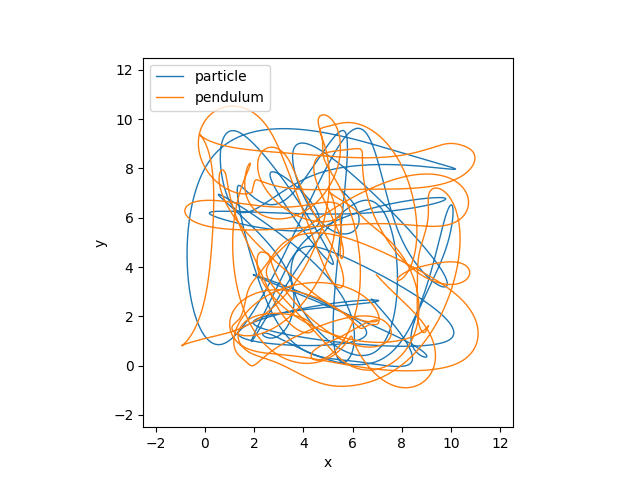
Our Pendulum trajectory is different.

Now, our distance check looks ok, so we can be more confident with this result - as crazy as it is!
Think about what this lets us do. We might write classes for a given situation. Then, say if we run an experiement and get some measured data, we can swap the relevant component for one that uses some measured data. Or, perhaps we have a new idea to test - we can easily swap out that part of the model and compare it back to back with the first.
We can validate our classes against unittests, theory, and experimental data. Then, we can run new models that use them without changing anything within those classes. This can provide confidence that we haven’t made any mistakes within those classes in the new model.