Tutorial 6 - Logging variables and stopping
We often want to output non-state values during calculation. We may want to end the calculation when a condition is met. Fortunately, these are both easy to do both with npsolve.
npsolve provides a special integrate method to help you do these. The integrate method is just a wrapper around npsolve’s ODEIntegrator class. By default, it uses the LSODA integrator in scipy (if scipy is present). However, it’s built to use any set of integrators that work like scipy’s ode. It works by breaking up the time domain into short frames. It uses the integrator to integrate between each frame as normal. scipy’s ode integrators are stateful, so they can continue with the next frame with minimal overhead.
At each frame, the Integrator class calls the step method in the System with a dictionary the log attribute. It’s designed to store any numeric data with strings for keys. The state variables and their values are logged by default, so you don’t need to add them.
The log dictionary also contains a special key called stop that has a boolean value. It’s normally False. Set it to True somewhere, and it will stop the solver after the current frame.
Here’s an example. Let’s change the step method of the Pendulum class in Tutorial 4 to add some logging and raise a stop flag. We’ll first do some imports:
import matplotlib.pyplot as plt
import npsolve
from tutorial_4 import Slider, Pendulum, Tether, Assembly, PPOS, PVEL
from tutorial_4 import get_inits

from npsolve.solvers import STOP
Let’s modify the Pendulum2 to add some logged parameters and change the stop flag if the force in the y-axis exceeds 24.0.
class Pendulum2(Pendulum):
    def get_derivs(self, state, t, log):
        """Called by the solver at each time step
        Calculate acceleration based on the
        """
        F_net = self._F_tether + self.F_gravity()
        acceleration = F_net / self.mass
        if log:
            log["F_tether"] = self._F_tether
            log["acceleration"] = acceleration
            if self._F_tether[1] > 24.0:
                log[STOP] = True
        derivatives = {PPOS: state[PVEL], PVEL: acceleration}
        return derivatives
We’ll modify our get_system method to use this class.
def get_system():
    slider = Slider()
    pendulum = Pendulum2()
    tether = Tether()
    assembly = Assembly(slider, pendulum, tether)
    system = npsolve.System()
    system.add_component(slider, "slider", "get_derivs")
    system.add_component(pendulum, "pendulum", "get_derivs")
    system.add_component(tether, "tether", None)
    system.add_component(assembly, "assembly", None)
    system.add_stage_call("assembly", "set_tether_forces")
    return system
Now, as usual, we’ll add a few functions to run and plot.
def run(t_end=20.0, n=100001):
    system = get_system()
    inits = get_inits(system)
    system.setup(inits)
    dct = npsolve.integrate(system, t_end=t_end, framerate=(n - 1) / t_end)
    return dct


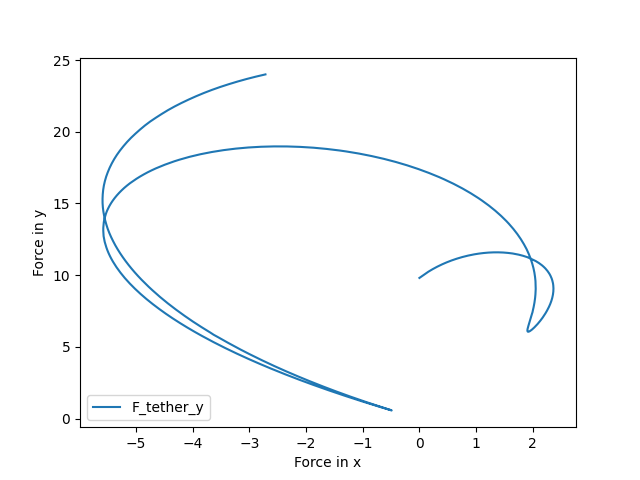
def plot_pivot_force(dct):
    plt.figure()
    plt.plot(dct["F_tether"][:, 0], dct["F_tether"][:, 1], label="F_tether_y")
    plt.xlabel("Force in x")
    plt.ylabel("Force in y")
    plt.legend(loc=3)
    plt.show()


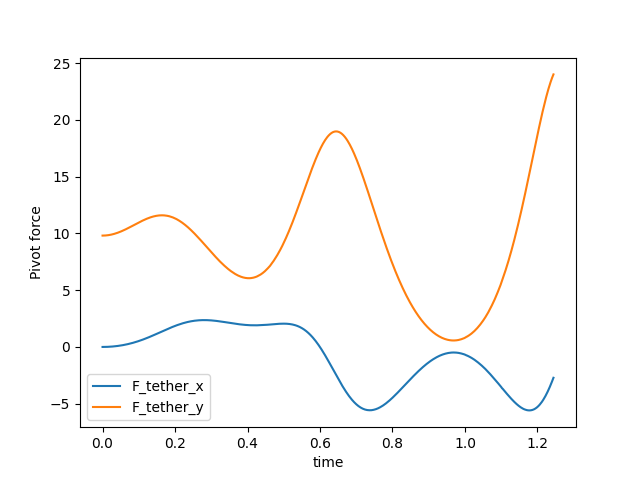
def plot_F_tether_vs_time(dct):
    plt.figure()
    plt.plot(dct["time"], dct["F_tether"][:, 0], label="F_tether_x")
    plt.plot(dct["time"], dct["F_tether"][:, 1], label="F_tether_y")
    plt.xlabel("time")
    plt.ylabel("Pivot force")
    plt.legend(loc=3)
    plt.show()


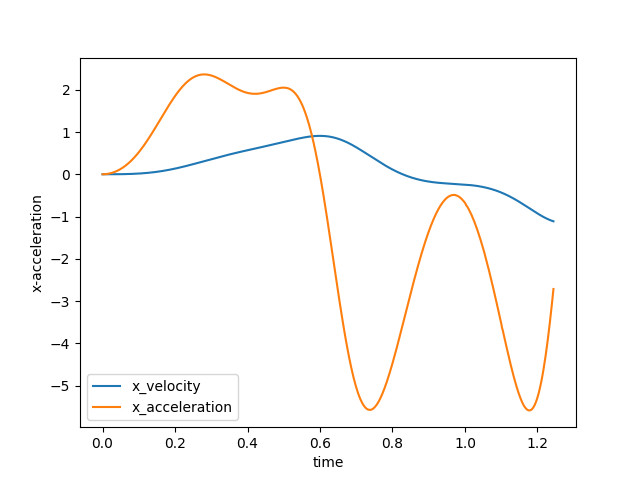
def plot_acc(dct):
    plt.figure()
    plt.plot(dct["time"], dct[PVEL][:, 0], label="x_velocity")
    plt.plot(dct["time"], dct["acceleration"][:, 0], label="x_acceleration")
    plt.xlabel("time")
    plt.ylabel("x-acceleration")
    plt.legend(loc=3)
    plt.show()


def execute():
    dct = run(t_end=20.0, n=10001)
    plot_pivot_force(dct)
    plot_F_tether_vs_time(dct)
    plot_acc(dct)


if __name__ == "__main__":
    execute()
Results
Now, the variables we logged are in the output dictionary, and it’s stopped when our stop condition was met.
It’s as easy as that.